
What's New in Helm CONNECT 1.37?
Helm CONNECT 1.37 is here, and it's a release full of practical changes for both your shoreside teams and your crew. You'll find fewer steps in the jobs you do every day, and a clearer record of the work afterwards. Here's some of what's new in each product line.
Helm CONNECT Maintenance
We made a number of improvements to Maintenance this release. Two of them help you keep more complete records.
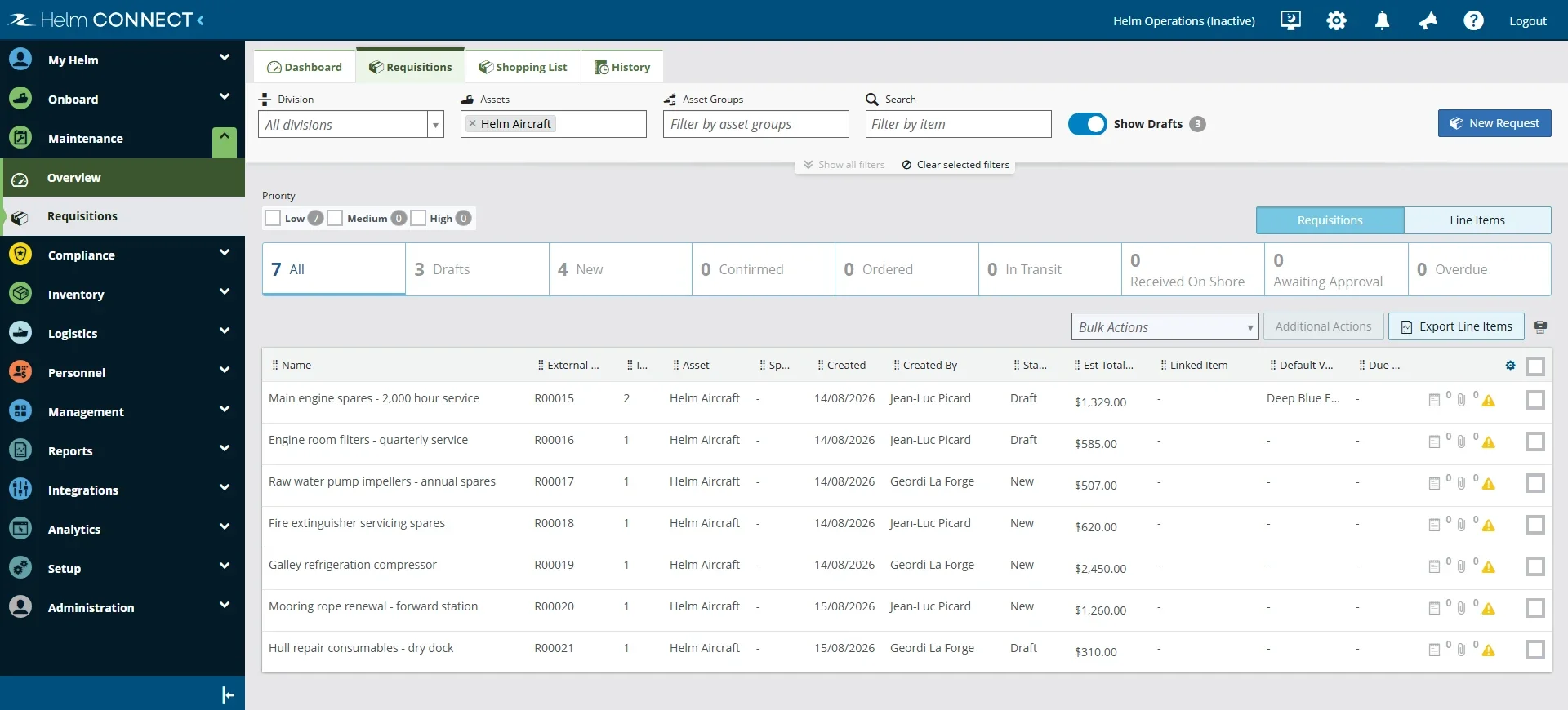
Requisition drafts let you save a requisition while you're still putting it together, then publish it when it's ready, whether you're on shore or onboard. Purchasing rarely happens in one sitting, so you can now start a requisition, gather your prices and quantities, and publish only when you're happy with it. Until then, your draft sits in your lists with a Draft status, and nothing else in Helm CONNECT acts on it.
A new Resolved By Vendor field lets you record a vendor as the one who resolved a task or corrective action, not just a person. When you contract the work out to a shipyard or a service contractor, the record shows who did the job.
Helm CONNECT Compliance
There's plenty new in Compliance too. These changes help you keep track of who did what, and what still needs doing.
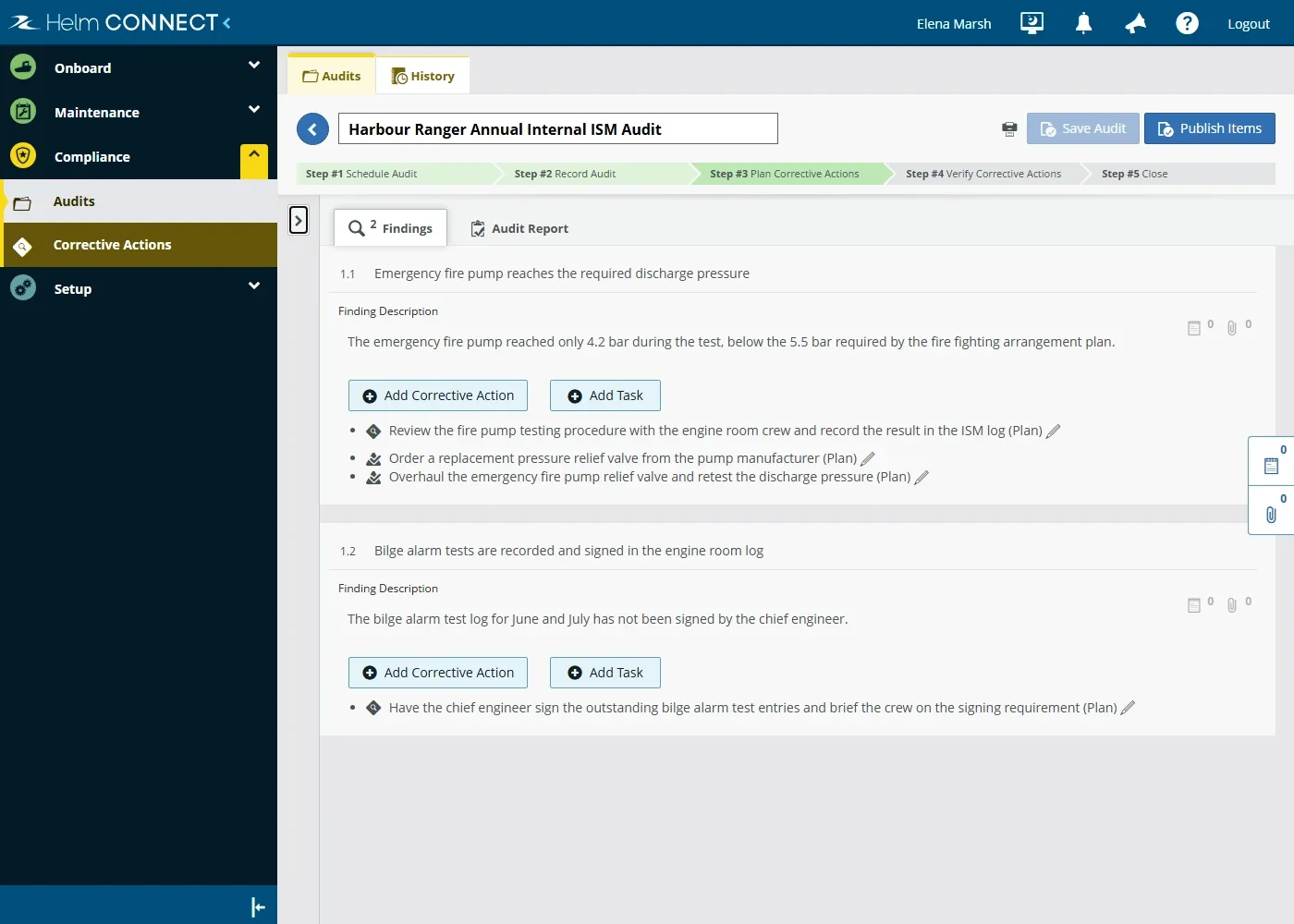
An Add Task button on every finding lets you raise a task without leaving the audit. Not every finding calls for a corrective action. Sometimes the fix is ordinary follow-up work: replace a worn hose, book a service, order a spare. Now you can raise a task right there, and it sits under the finding alongside any corrective actions. An outstanding task won't hold the audit open.
Role-by-role control over notes lets you decide who can post a note under someone else's name, and who can change or remove notes other people wrote. If your dispatchers record phone calls on behalf of your captains, you can allow that, and still keep everyone else's notes exactly as they were written. These permissions apply wherever you use notes in Helm CONNECT, not just in Compliance.
Helm CONNECT Logistics
For our Logistics customers, the Logbook is where you'll notice this release most.
Instructions on your event and activity types let you tell your crew what to do while they log an entry. The instructions appear in a banner at the top of the entry window, so your crew have the guidance in front of them instead of having to remember it from training or look it up somewhere else.
A new Current Crew data source is now an option for the custom fields on your events and activities. On a multi select box field, an Add Current Crew icon adds everyone who was onboard the asset at the entry's date and time, instead of searching for each crew member and adding them one at a time.
Tenant-wide Logbook preferences let you set how the Logbook opens for your whole fleet at once. A new section on the Setup > Tenant Preferences tab controls whether it opens to today's date or remembers the date you last selected, along with the order your widgets appear in.
New snippets for your logbook description give you more control over what goes into the Description field when your crew log an event.
Helm CONNECT Personnel
Improvements reach across the whole Personnel product line this release.
Payroll class changes now appear in the change log when you open a person's record, alongside the base rate and payroll group entries that were already there. A person's pay history sits in one place. Your Work Rest and Timesheets settings have change logs of their own now, so you can see what changed in your organization's settings, and when.
Crew certifications are easier to work through in 1.37. You can filter and search in the Requests and History views, and choose how many rows to show at a time, so a long list of pending renewals takes less time to get through. Certification warnings on a crew change also appear right away when a crew member has only one or two warnings.
The Columns button on the Crew tab lets you show certain standard fields from a person's record alongside your custom fields, so your team sees the details it actually works with. Timesheets has the same kind of control now. You can hide the standard columns your team doesn't need, apart from Date and Crew, which stay locked on the Logistics, Onboard and Payroll views.
The Single Crew Change window can now stay open after you save, so adding several crew changes no longer means reopening it each time. A crew member's position also fills in automatically when you add them.
Helm CONNECT Analytics
Your dashboards got a lot of attention in 1.37. You'll find a new tab on the Vessel Utilization dashboard, along with thorough updates to two others.
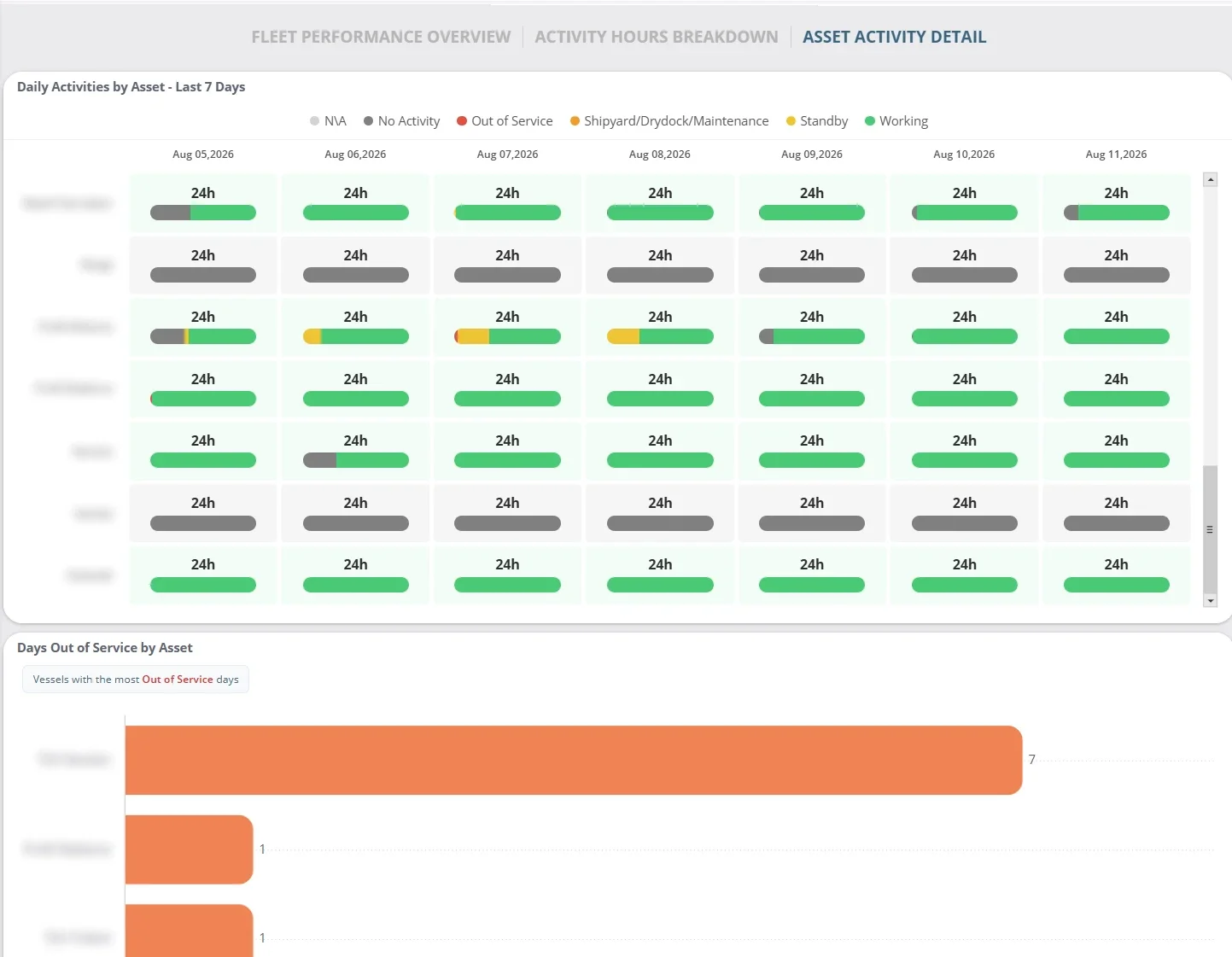
A new Asset Activity Details tab on the Vessel Utilization dashboard brings recent activity and availability for your assets into one place. A day-by-day breakdown shows how each asset spent its time over the past seven days, and a second chart picks out the assets with the most days out of service.
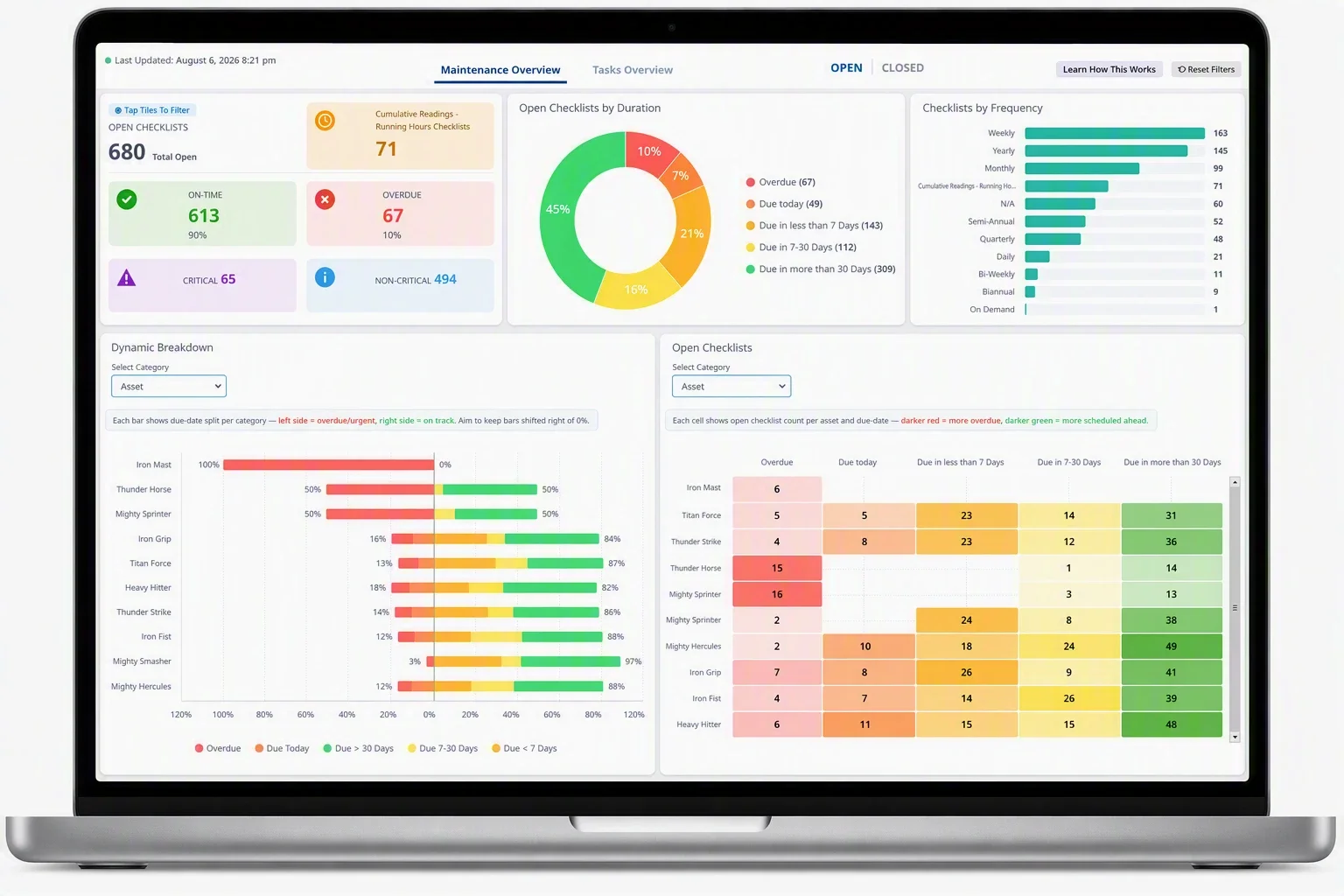
The Maintenance Pro dashboard now tells you much more about your checklists. The Open / Closed toggle switches the whole dashboard between outstanding and completed work, and clicking any tile or chart filters everything else. A new failure analysis section highlights recurring No / Fail responses, so you can spot quality problems as well as late work.
The Interchange dashboard in Logistics Pro gives you a clearer picture of how your fleet uses and supplies competitor resources. You can see whether you're a net buyer or net seller of tug capacity, and where demand for competitor tugs is highest.
Did You Miss These Updates to Version 1.36?
Not every improvement waits for a release. The features below came out after Version 1.36, so they've been available for a while now. As always, you'll find each one in the Updates section of the Version 1.36: Release Notes, along with the fixes from the same period.
Expiry dates on your documents (Compliance) tell you when a document is about to expire. When one is within 30 days of expiring, or has already expired, Helm CONNECT adds a watermark to the PDF when you print or preview it, and notifies the responsible parties by email.
Additional viewers on private forms (Compliance) let the form's submitter give named people access to it, which supports workflows like pilot assessments where visibility needs to stay limited.
Write support on the Corrective Actions API (Compliance) means your integrations can create and update corrective actions in Helm CONNECT, not just read them. The api/v2/public/CorrectiveActions endpoint now supports POST and PATCH.
Requisitions (Maintenance) picked up several improvements. Helm CONNECT now warns you when more than one person is editing the same requisition, you can sort the Requisitions list by custom field columns, and your line item exports to Excel can include custom fields.
A new "Required when received on asset" option (Maintenance) lets you make a custom field required when a line item's status is set to Received on Asset.
Cargo fluid reporting (Logistics) gained a new Cargo Fluid per Asset Records data source that reports at the asset level. We also renamed the Cargo Fluid Records data source to Cargo Fluid per Tanks/Holds Records, and the data it returns hasn't changed.
The Crew Certifications 2 data source (Personnel) now includes fields from the assets associated with your certification records.
These are just some of the highlights in Helm CONNECT 1.37. For all the details, be sure to read the Version 1.37: Release Notes, and don't forget to subscribe to our newsletter to stay up to date with the latest Helm news.
Join Us at Helm Conference 2026
Helm Conference 2026 is almost here, and there's still time to register. We're hosting it October 20 to 22 at the Fairmont Empress in Victoria, BC, which happens to be our home city, so we're looking forward to showing you around. Expect three days of hands-on training, sessions from fellow users and technology partners, and a first look at where Helm CONNECT is heading.